EduGPT Tutor Agent
From Idea to Implementation: Building an AI Educator Agent
Introduction
Welcome to the EduGPT Tutor Agent tutorial using Google's Agent Development Kit (ADK).
At its core, EduGPT has two unique phases: first, it assumes the persona of a curriculum designer to outline a subject. Then, it steps into the role of an educator to teach the user according to that generated syllabus. ADK handles this fluid transformation via its Sequential Orchestrator and Dynamic Prompt State Injection.
Project Structure
A pristine ADK project separates its logic. Here is exactly what our new edugpt_agent folder
looks like:
/edugpt_agent/
    ├── __init__.py          # 🚪 Points ADK to the `root_agent`
    ├── agent.py             # 🧠 The Brains: Syllabus Generator + Teaching Instructor
    ├── tools.py             # 🛠️ The Toolkit: Google Search tools mapping
    ├── prompts.py           # 🎭 The Instructions: Prompt templates
    ├── standalone_tutor.py  # ⚙️ Option for pure CLI execution testing
    ├── .env                 # 🔑 API credentials location
    └── run_agent.sh         # 🚀 Launcher for Web UI
Step 2: Dual Prompting Strategy
In our prompts.py, we split the teaching logic into two incredibly specific prompts.
# prompts.py

# Prompt 1: The Curriculum Designer 📝
SYLLABUS_GENERATOR_PROMPT = """
You are an expert curriculum designer and academic instructor.
Your task is to generate a comprehensive, structured course syllabus...
... ONLY output the syllabus itself, as this will be parsed directly by the instructor agent.
"""

# Prompt 2: The Educator 🎓
TEACHING_AGENT_PROMPT = """
As an expert instructor agent, your task is to teach the user based on the provided syllabus...
===
{syllabus_content}
===
First Step: ... present the syllabus outline to the user.
Subsequent Steps: Go deeply into definitions... WAIT for the user to confirm they understand.
"""
Step 3: Access to External Knowledge
To teach adequately, especially on highly technical topics, an agent shouldn't rely solely on its
training data. We map the ADK built-in google_search functionally inside
tools.py so both the syllabus planner and the instructor can look up facts or trends.
# tools.py
from google.adk.tools import google_search
# Any custom tools, like checking Wikipedia or doing math evaluations, would also go here.
Step 4: The Pipeline (Orchestration)
Instead of manual code writing to parse the syllabus and then enter an interactive loop, we use a SequentialAgent. This is the main piece of the ADK logic.
# agent.py
from google.adk.agents import LlmAgent, SequentialAgent
from .tools import google_search
from .prompts import SYLLABUS_GENERATOR_PROMPT, TEACHING_AGENT_PROMPT

# Phase 1: Planning
syllabus_generator = LlmAgent(
    name="syllabus_generator",
    instruction=SYLLABUS_GENERATOR_PROMPT,
    tools=[google_search],
    output_key="syllabus_content" # ADK magically saves the output here!
)

# Phase 2: Interacting
teaching_instructor = LlmAgent(
    name="teaching_instructor",
    instruction=TEACHING_AGENT_PROMPT,
    tools=[google_search]
)

# Phase 3: Bringing it Together
root_agent = SequentialAgent(
    name="edugpt_agent",
    sub_agents=[syllabus_generator, teaching_instructor]
)
Step 5: Putting it all Together
If you prefer an all-in-one file to bypass the folder structure logic for rapid iteration, you can run the standalone python script directly from the terminal:
import os
import asyncio
from dotenv import load_dotenv
from google.adk.agents import LlmAgent, SequentialAgent
from google.adk.tools import google_search

# -- Environment --
load_dotenv(dotenv_path=os.path.join(os.path.dirname(__file__), ".env"))

# -- Prompts (Abbreviated) --
SYLLABUS_PROMPT = "Generate a course syllabus. output format: markdown only."
TEACH_PROMPT = "Teach the user using this syllabus: \n{syllabus_content}"

# -- Agents --
syllabus_generator = LlmAgent(
    name="generator",
    model="gemini-2.5-flash",
    instruction=SYLLABUS_PROMPT,
    output_key="syllabus_content"
)

teaching_instructor = LlmAgent(
    name="instructor",
    model="gemini-2.5-flash",
    tools=[google_search],
    instruction=TEACH_PROMPT
)

root_agent = SequentialAgent(
    name="edugpt_agent",
    sub_agents=[syllabus_generator, teaching_instructor]
)

if __name__ == "__main__":
    from google.adk.cli.adk_run import serve_agent_cli
    asyncio.run(serve_agent_cli(root_agent))
Final Result
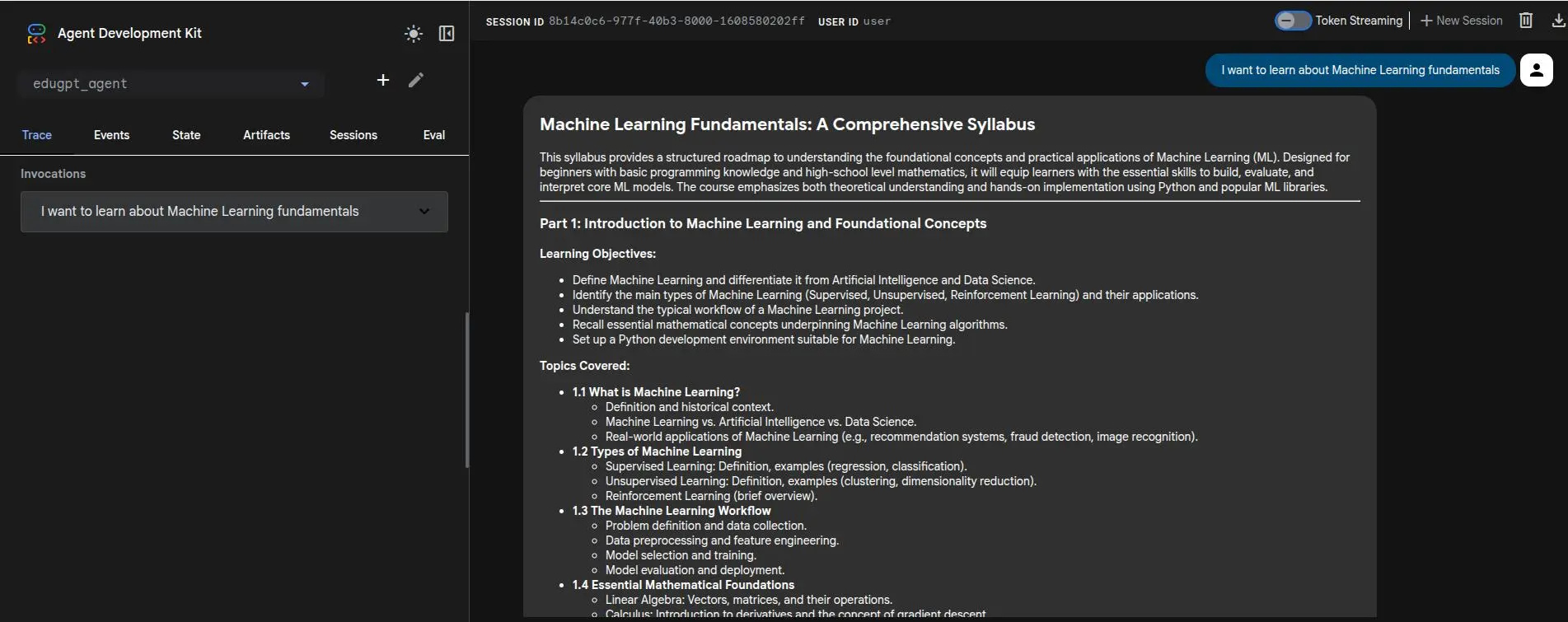
Below is a screenshot of the EduGPT Tutor Agent running in action. You can see how the agent seamlessly transition from its syllabus planning phase into the interactive conversational tutor phase.