Medical Diagnostics Agent
Zero to Hero: Building a Multi-Agent Medical Council with Google ADK
Introduction
In this tutorial, we will dissect the Medical Diagnostics Agent. Unlike simple chatbots, this is an advanced multi-agent system simulating an entire medical panel. We built this using Google's Agent Development Kit (ADK).
By the end of this guide, you will understand how to orchestrate parallel AI specialists and synthesize their findings into a final diagnosis.
Project Structure
A robust multi-agent team is organized clearly. Here is our file map:
/medical_diagnostics_agent/
    ├── __init__.py        # 🚪 Entry Point: Exposes the Master Orchestrator to ADK
    ├── agent.py           # 🧠 The Brains: Specialist agents & Parallel/Sequential logic
    ├── prompts.py         # 🎭 The Personas: System instructions for each specialist
    ├── .env               # 🔑 Keys: Gemini API credentials
    └── run_agent.sh       # 🚀 Launcher: Script to start the ADK Web UI
Step 2: Environment Setup
Before our agents can think, they need access to the brain (Gemini LM). We keep our API credentials safely inside the .env file.
# .env
# Toggle Vertex AI off to use regular AI Studio keys
GOOGLE_GENAI_USE_VERTEXAI=0
GOOGLE_API_KEY=AIzaSy...YourKeyHere...
Step 3: Creating the Medical Council Personas
We define three distinct specialist personas. Each prompt instructs the AI to look at the same patient report but from an entirely different medical perspective.
# prompts.py

CARDIOLOGIST_PROMPT = """
Act like a cardiologist. Review the patient's medical report.
Focus: Determine if there are any subtle signs of cardiac issues...
"""

PULMONOLOGIST_PROMPT = """
Act like a pulmonologist. Review the patient's report...
Focus: Identify any potential respiratory issues, such as asthma, COPD...
"""

# The Synthesizer Prompt leverages ADK's ability to inject outputs from previous agents!
MULTIDISCIPLINARY_PROMPT = """
Act like a multidisciplinary team. Review these specialist reports and formulate a final diagnosis.
---
### CARDIOLOGIST REPORT
{cardiologist_report}

### PULMONOLOGIST REPORT
{pulmonologist_report}
...
"""
{cardiologist_report} syntax automatically tells the ADK framework to pull the variable stored as `cardiologist_report` from the session state and inject it right into the final prompt!
Step 4: The Workflow Orchestration (Parallel & Sequential)
This is where the magic happens. We build the individual doctors, run them at the exact same time (Parallel), and then pipe their answers to the Lead Doctor (Sequential).
1. Building the Specialists
# agent.py
from google.adk.agents import LlmAgent, ParallelAgent, SequentialAgent

# We assign the 'output_key' so the framework saves their answer to the session state!
cardiologist_agent = LlmAgent(
    name="cardiologist",
    model="gemini-2.5-flash",
    instruction=CARDIOLOGIST_PROMPT,
    output_key="cardiologist_report"
)

pulmonologist_agent = LlmAgent(
    name="pulmonologist",
    # ...
    output_key="pulmonologist_report"
)
2. The Parallel Panel
We use a ParallelAgent to make the doctors read the report at the exact same time. This saves massive amounts of time compared to running them one by one.
# --- EXPERT PANEL (Parallel Execution) ---
specialists_panel = ParallelAgent(
    name="specialist_panel",
    sub_agents=[cardiologist_agent, psychologist_agent, pulmonologist_agent]
)
3. The Sequential Pipeline (Master Orchestrator)
Finally, we use a SequentialAgent to enforce the rule: Specialists First, Final Diagnosis Second.
# --- LEAD DOCTOR (Synthesizer) ---
multidisciplinary_team = LlmAgent(
    name="multidisciplinary_team",
    instruction=MULTIDISCIPLINARY_PROMPT,
    output_key="final_diagnosis"
)

# --- ROOT ORCHESTRATOR ---
root_agent = SequentialAgent(
    name="medical_diagnostics_agent",
    sub_agents=[specialists_panel, multidisciplinary_team]
)
Step 5: Launching the Web UI
We launch the application using a convenient bash script. Just like in the HIA tutorial, we execute the `adk web` command from the parent directory.
#!/bin/bash
# run_agent.sh

cd "$(dirname "$0")" # Go to script folder
cd ..                # Go to parent ADK folder

echo "Starting ADK Web UI for Medical Diagnostics Agent..."
adk web .
Final Result
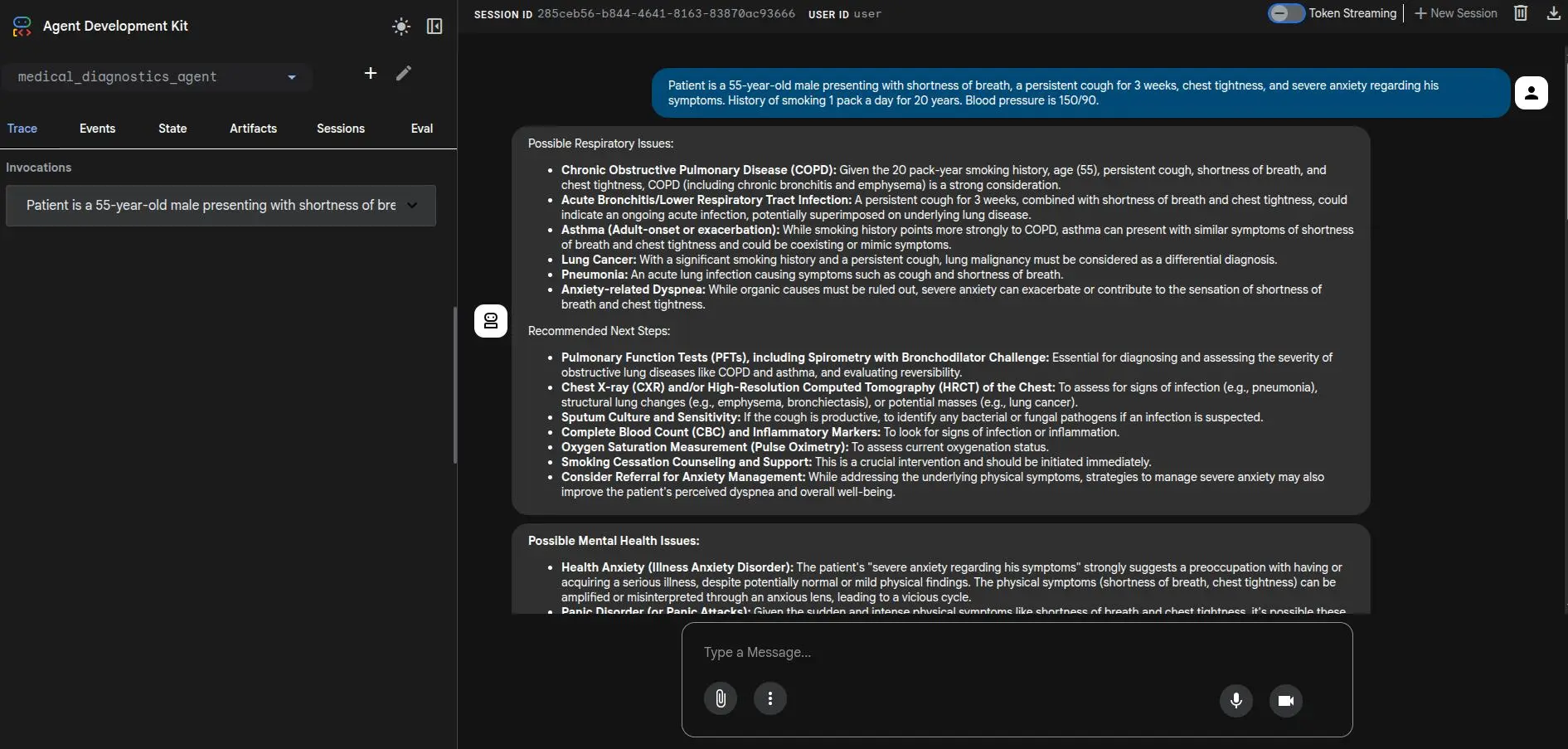
When you feed the agent a patient's symptoms, watch the Trace view! You'll see the parallel agents fire simultaneously, followed by the synthesizer rendering the final, multidisciplinary diagnosis.