AI Travel Agent
Mastering Parallel Agents in Google ADK: The Travel Planner Case Study
Introduction
Welcome to the Travel Agent tutorial! In this guide, we'll show you how to create a travel planning bot using Google's Agent Development Kit (ADK).
This agent uses a hierarchical team structure: a ParallelAgent coordinates the simultaneous research of flights and hotels using Gemini's built-in Google Search. Finally, a Lead Travel Agent synthesizes these results into a professional itinerary and prepares an HTML email proposal.
Project Structure
We've organized the project for modularity and clarity. Here is the structure:
/travel_agent/
    ├── __init__.py         # Required package declaration
    ├── agent.py            # Orchestrator: Research Team + Lead Agent
    ├── tools.py            # Email delivery via SendGrid
    ├── prompts.py          # Personas: Flight Expert, Hotel Concierge, Lead Agent
    ├── standalone_agent.py # Self-contained CLI tester
    ├── .env                # API Keys for Gemini, Search, and Email
    └── run_agent.sh        # Command-line launcher
Step 2: Custom Tools
While the agent uses built-in search, we implemented a custom tool for final delivery via email:
import os
from sendgrid import SendGridAPIClient
from sendgrid.helpers.mail import Mail

def send_email(to_email: str, subject: str, html_content: str) -> dict:
    """Sends an email with the travel itinerary using SendGrid."""
    from_email = os.environ.get('FROM_EMAIL')
    sg_api_key = os.environ.get('SENDGRID_API_KEY')

    message = Mail(from_email=from_email, to_emails=to_email,
                   subject=subject, html_content=html_content)
    try:
        sg = SendGridAPIClient(sg_api_key)
        response = sg.send(message)
        return {"status": "success", "status_code": response.status_code}
    except Exception as e:
        return {"status": "error", "message": str(e)}
Step 3: Specialist Personas
Each agent has a specific role. We use prompt templates to pass outputs from one stage to the next.
FLIGHT_MATCHER_PROMPT = """
Act as a Flight Research Specialist. Use Google Search to find best flight options.
"""

HOTEL_MATCHER_PROMPT = """
Act as a Hotel Concierge. Use Google Search to find top-rated accommodations.
"""

LEAD_TRAVEL_AGENT_PROMPT = """
Act as the Lead Travel Agent. Synthesize research from:
1. Flight Matcher: {flight_report}
2. Hotel Matcher: {hotel_report}

Generate a JSON itinerary including a professional client proposal and email HTML.
"""
Step 4: The Hierarchical Flow
We use a ParallelAgent to research flights and hotels concurrently, followed by a SequentialAgent to synthesize the final plan.
from google.adk.agents import LlmAgent, ParallelAgent, SequentialAgent
from google.adk.tools.google_search_tool import google_search

flight_matcher = LlmAgent(name="flight_matcher", tools=[google_search],
                          output_key="flight_report")
hotel_matcher = LlmAgent(name="hotel_matcher", tools=[google_search],
                         output_key="hotel_report")

research_team = ParallelAgent(name="research_team",
                               sub_agents=[flight_matcher, hotel_matcher])

lead_agent = LlmAgent(name="lead_agent", output_key="final_travel_package")

root_agent = SequentialAgent(name="travel_agent_orchestrator",
                             sub_agents=[research_team, lead_agent])
Step 5: The Complete Script
To bypass the need for modular directory architecture and run this app instantly from the CLI, here is the entirely self-contained logic packaged into one script.
import os
import asyncio
from dotenv import load_dotenv
from google.adk.agents import LlmAgent, ParallelAgent, SequentialAgent
from google.adk.tools.google_search_tool import google_search
from sendgrid import SendGridAPIClient
from sendgrid.helpers.mail import Mail

# Load Environment Variables
# Create a .env file with GOOGLE_API_KEY, SERPAPI_API_KEY, etc.
load_dotenv(dotenv_path=os.path.join(os.path.dirname(__file__), ".env"))

# --- TOOLS ---
def send_email(to_email: str, subject: str, html_content: str) -> dict:
    """Sends an email with the travel itinerary using SendGrid."""
    from_email = os.environ.get('FROM_EMAIL')
    sg_api_key = os.environ.get('SENDGRID_API_KEY')

    if not sg_api_key:
        return {"status": "error", "message": "SENDGRID_API_KEY not configured."}

    message = Mail(from_email=from_email, to_emails=to_email,
                   subject=subject, html_content=html_content)
    try:
        sg = SendGridAPIClient(sg_api_key)
        response = sg.send(message)
        return {"status": "success", "status_code": response.status_code}
    except Exception as e:
        return {"status": "error", "message": str(e)}

# --- PROMPTS ---
FLIGHT_MATCHER_PROMPT = """
Act as an expert Flight Research Specialist.
Task: Use Google Search to find the best flight options for the user's request.
Focus: Look for current flight availability, prices, and airline options.
Output: Summarize the top 3 flight options (Airlines, approximate prices, and booking platforms). provide these details to the Lead Agent.
"""

HOTEL_MATCHER_PROMPT = """
Act as a Luxury Hotel Concierge.
Task: Use Google Search to find top-rated accommodation for the requested destination and dates.
Focus: Search for hotels with high ratings and specific amenities mentioned by the user.
Output: Summarize the top 5 hotel options (Name, Rating, Price range, and Key Amenities). provide these details to the Lead Agent.
"""

LEAD_TRAVEL_AGENT_PROMPT = """
Act as the Lead Travel Agent. You are specialized in creating dream vacations.
You will receive research from:
1. Flight Matcher (Flight research results)
2. Hotel Matcher (Hotel research results)

Your task is to:
1. Synthesize these research findings into a professional travel proposal.
2. Present a balanced plan (best value + best experience).
3. If an email address was provided in the query, include a finalized proposal.

**Your output must be a professional summary for the user.**

Additionally, you must produce a valid HTML version of this proposal for email delivery if requested.

Return ONLY a valid JSON object matching this exact schema:
{{
    "client_proposal": "A friendly, expert summary of the suggested itinerary.",
    "top_picks": {{
        "flight": "The #1 flight recommendation details",
        "hotel": "The #1 hotel recommendation details"
    }},
    "email_html_body": "A complete, styled HTML body for an email containing the full itinerary (no markdown preamble)."
}}

---
### FLIGHT RESEARCH REPORT
{flight_report}

---
### HOTEL RESEARCH REPORT
{hotel_report}
"""

# --- AGENTS ---
flight_matcher = LlmAgent(
    name="flight_matcher",
    model="gemini-2.0-flash",
    description="Researches flights using Google Search.",
    instruction=FLIGHT_MATCHER_PROMPT,
    tools=[google_search],
    output_key="flight_report"
)

hotel_matcher = LlmAgent(
    name="hotel_matcher",
    model="gemini-2.0-flash",
    description="Researches hotels using Google Search.",
    instruction=HOTEL_MATCHER_PROMPT,
    tools=[google_search],
    output_key="hotel_report"
)

research_team = ParallelAgent(
    name="research_team",
    description="Conducts concurrent research on flights and hotels.",
    sub_agents=[flight_matcher, hotel_matcher]
)

lead_travel_agent = LlmAgent(
    name="lead_travel_agent",
    model="gemini-2.0-flash",
    description="Synthesizes research into a final travel proposal.",
    instruction=LEAD_TRAVEL_AGENT_PROMPT,
    tools=[send_email],
    output_key="final_travel_package"
)

root_agent = SequentialAgent(
    name="travel_agent_orchestrator",
    description="An AI travel agency that plans trips using Google Search.",
    sub_agents=[research_team, lead_travel_agent]
)

if __name__ == "__main__":
    from google.adk.cli.adk_run import serve_agent_cli
    print("Launching Travel Agent in CLI Mode...")
    asyncio.run(serve_agent_cli(root_agent))
Final Result
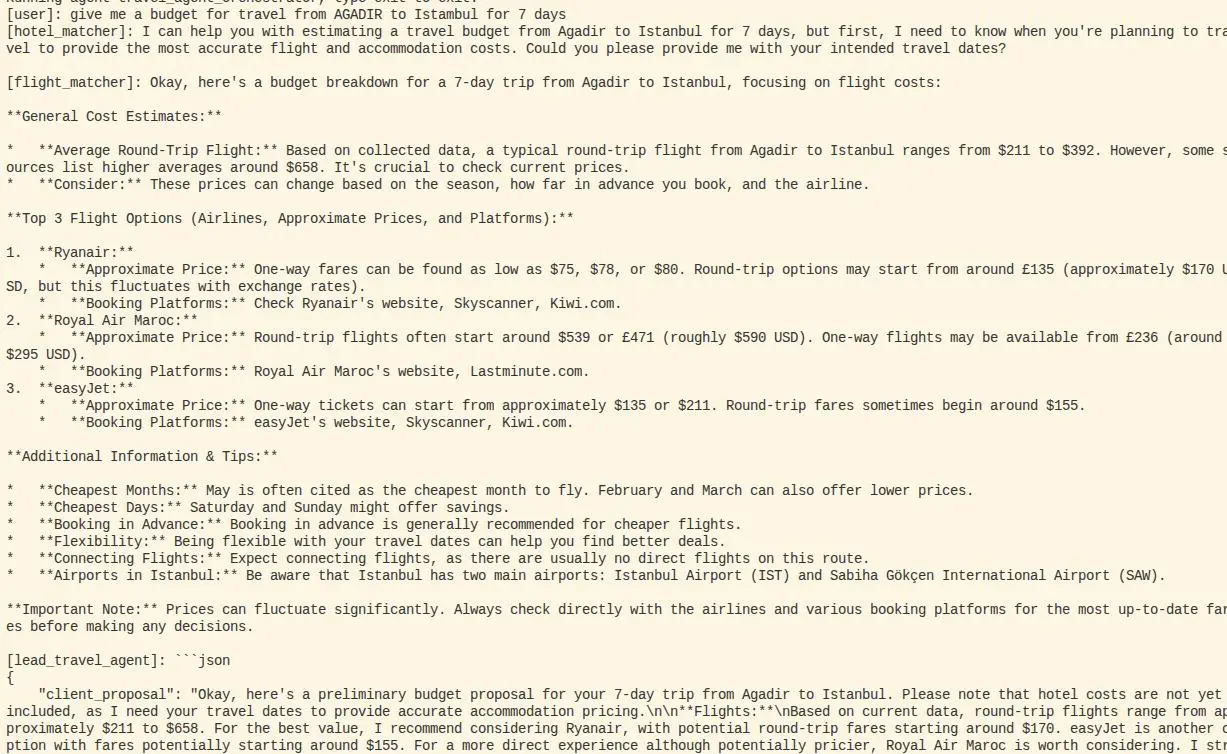
Here is a demonstration of the travel planning result produced by the agent: