AI Real Estate Agent
Zero to Hero: Converting a Custom Python Brokerage Bot to Google ADK
Introduction
Welcome to the Real Estate Agent tutorial! Here, we break down how to create a multi-agent brokerage simulation using Google's Agent Development Kit (ADK).
This implementation heavily leverages ADK's ParallelAgent orchestrator. Instead of
polling separate experts sequentially and slowing down user interactions, the master orchestrator fires
off a property_matcher search and a market_analyst macroeconomic check at
the exact same time. Once both finish computing, their reports combine into a final cohesive
client strategy.
Project Structure
We split our application up into elegant, manageable pieces. Here is what the folder structure looks like:
/real_estate_agent/
    ├── __init__.py                # 🚪 Required package declaration
    ├── agent.py                   # 🧠 The Logic: Parallel Research + Sequential Lead Agent
    ├── tools.py                   # 🛠️ The Hooks: Fetch properties & trends
    ├── prompts.py                 # 🎭 The Instructions: Roles defined
    ├── standalone_real_estate.py  # ⚙️ Testing CLI script (Complete Code below)
    ├── .env                       # 🔑 Keys pointing to Gemini 2.5 Flash
    └── run_agent.sh               # 🚀 Web UI launcher
Step 2: External Functions
Our agents constantly need connection to real-world data to be useful. We define two functions simulating API payloads:
# tools.py
import random

def search_properties(location: str, max_budget: int, min_bedrooms: int) -> dict:
    """
    Search for available properties in a specific location matching the criteria.
    Args:
        location: City or neighborhood string.
        max_budget: The maximum budget in USD.
        min_bedrooms: The minimum number of bedrooms.
    """
    # Simulate a Zillow/Redfin database
    properties = [
        {"id": 101, "address": f"123 Maple St, {location}", "price": max_budget * 0.8, "bedrooms": min_bedrooms, "type": "Single Family"},
        {"id": 102, "address": f"456 Oak Avenue, {location}", "price": max_budget * 0.95, "bedrooms": min_bedrooms + 1, "type": "Condo"},
        {"id": 103, "address": f"789 Pine Road, {location}", "price": max_budget * 1.1, "bedrooms": min_bedrooms, "type": "Townhouse"}
    ]

    # Filter by budget
    results = [p for p in properties if p["price"] <= max_budget]
    if results:
        return {"status": "success", "results": results}
    return {"status": "error", "message": f"No properties found in {location} under ${max_budget}."}

def get_market_trends(location: str) -> dict:
    """
    Fetches the latest real estate market trends for a neighborhood or city.
    """
    trends = [
        "Buyer's market: Inventory is up 15% year-over-year.",
        "Seller's market: Homes are selling 5% above asking price on average.",
        "Interest rates have dropped slightly, increasing buyer demand.",
        "New school district zoning is driving up prices."
    ]
    return {
        "location": location,
        "current_trend": random.choice(trends),
        "average_days_on_market": random.randint(14, 60)
    }
Step 3: State Injection and Personas
The Lead Agent isn't performing the lookup—it's analyzing the reports handed up by its specialized
workers. Using ADK's prompt templating, we inject the {property_report} and
{market_report} explicitly into the Master's context window without needing manual
`format()` calls in Python.
# prompts.py

PROPERTY_MATCHER_PROMPT = """
Act as an expert Property Matcher. You will be given a user's real estate request.
Task: Your job is to extract their location, budget, and bedroom requirements.
Next, use the `search_properties` tool to find suitable homes for them.
Focus: Pay attention to properties strictly within their budget.
Output: Summarize the available properties you found and explain why they match the user's criteria. Focus purely on the property specifics (price, rooms, type).
"""

MARKET_ANALYST_PROMPT = """
Act as a hyper-local Real Estate Market Analyst. You will read the user's requested location.
Task: Use the `get_market_trends` tool to understand the current economic environment in that area.
Focus: Determine if they are buying at a good time. Should they negotiate aggressively, or act fast to beat other buyers?
Output: Summarize the market trends and provide a tactical recommendation purely based on the local market health.
"""

LEAD_AGENT_PROMPT = """
Act as the Lead Real Estate Agent.
You are the final point of contact synthesizing information for the buyer.
You will receive advice from two sub-agents:
1. Property Matcher (Which homes fit)
2. Market Analyst (What the neighborhood economy is doing)

Task: Combine these insights into a highly professional, cohesive pitch for the buyer.
Your goal is to present the best property options, framed by the market reality.

Return ONLY a valid JSON object matching this exact schema:
{{
    "client_strategy": "A brief overview of how we should approach buying in this area",
    "top_property_recommendation": "The address and details of the #1 best match",
    "urgency_level": "low" | "medium" | "high",
    "market_warning": "Any risks or red flags based on the analyst's report."
}}

---
### PROPERTY MATCHER REPORT
{property_report}

---
### MARKET ANALYST REPORT
{market_report}
"""
{property_report} is populated magically because
we assign output_key="property_report" to the property matcher agent config. The ADK state
machine manages the data transfer behind the scenes!
Step 4: The Parallel Pipeline
By nesting a `ParallelAgent` inside a `SequentialAgent`, we can guarantee that the lead agent waits for the backend analysis to finish, but simultaneously minimize wait times since the property lookup and trend evaluations execute concurrently.
# agent.py
import os
from dotenv import load_dotenv

current_dir = os.path.dirname(os.path.abspath(__file__))
env_path = os.path.join(current_dir, ".env")
load_dotenv(dotenv_path=env_path)

from google.adk.agents import LlmAgent, ParallelAgent, SequentialAgent
from .tools import search_properties, get_market_trends
from .prompts import PROPERTY_MATCHER_PROMPT, MARKET_ANALYST_PROMPT, LEAD_AGENT_PROMPT

# --- WORKERS (The Real Estate Team) ---
property_matcher = LlmAgent(
    name="property_matcher",
    model="gemini-2.5-flash",
    description="Matches user criteria with available properties using search tools.",
    instruction=PROPERTY_MATCHER_PROMPT,
    tools=[search_properties],
    output_key="property_report" # Saved for the Lead Agent
)

market_analyst = LlmAgent(
    name="market_analyst",
    model="gemini-2.5-flash",
    description="Analyzes the local real estate market trends.",
    instruction=MARKET_ANALYST_PROMPT,
    tools=[get_market_trends],
    output_key="market_report"
)

# --- THE PARALLEL PANEL ---
# Runs both analysts concurrently to cut latency in half!
research_team = ParallelAgent(
    name="research_team",
    description="Gathers property listings and market trends at the same time.",
    sub_agents=[property_matcher, market_analyst]
)

# --- THE LEAD AGENT (Synthesizer) ---
lead_agent = LlmAgent(
    name="lead_agent",
    model="gemini-2.5-flash",
    description="Creates a finalized strategy based on available properties and market intelligence.",
    instruction=LEAD_AGENT_PROMPT,
    output_key="final_client_proposal"
)

# --- THE ORCHESTRATOR ---
root_agent = SequentialAgent(
    name="real_estate_agent",
    description="An AI real estate brokerage simulating property matching and local market strategy.",
    sub_agents=[research_team, lead_agent]
)
Step 5: The Complete Script
To bypass the need for modular directory architecture and run this app instantly from the CLI, here is the entirely self-contained logic packaged into one script.
import os
import random
import asyncio
from dotenv import load_dotenv
from google.adk.agents import LlmAgent, ParallelAgent, SequentialAgent

# Load Environment Variables
load_dotenv(dotenv_path=os.path.join(os.path.dirname(__file__), ".env"))

# --- TOOLS ---
def search_properties(location: str, max_budget: int, min_bedrooms: int) -> dict:
    properties = [
        {"id": 101, "address": f"123 Maple St, {location}", "price": max_budget * 0.8, "bedrooms": min_bedrooms, "type": "Single Family"},
        {"id": 102, "address": f"456 Oak Avenue, {location}", "price": max_budget * 0.95, "bedrooms": min_bedrooms + 1, "type": "Condo"},
        {"id": 103, "address": f"789 Pine Road, {location}", "price": max_budget * 1.1, "bedrooms": min_bedrooms, "type": "Townhouse"}
    ]
    results = [p for p in properties if p["price"] <= max_budget]
    if results:
        return {"status": "success", "results": results}
    return {"status": "error", "message": f"No properties found in {location} under ${max_budget}."}

def get_market_trends(location: str) -> dict:
    trends = [
        "Buyer's market: Inventory is up 15% year-over-year.",
        "Seller's market: Homes selling 5% above asking on average.",
        "Interest rates dropped slightly, increasing demand."
    ]
    return {
        "location": location,
        "current_trend": random.choice(trends),
        "days_on_market": random.randint(14, 60)
    }

# --- PROMPTS ---
PROPERTY_MATCHER_PROMPT = """Act as a Property Matcher.
Extract the user's location, budget, and bedroom requirements.
Use the `search_properties` tool to find suitable homes strictly within budget.
Summarize the match specifics.
"""

MARKET_ANALYST_PROMPT = """Act as a Real Estate Market Analyst.
Use the `get_market_trends` tool to understand the local economy.
Determine if they should negotiate aggressively or act fast.
"""

LEAD_AGENT_PROMPT = """Act as the Lead Real Estate Agent.
Synthesize advice from:
1. Property Matcher (Which homes fit)
2. Market Analyst (Neighborhood economy)

Return ONLY a valid JSON object:
{{
    "client_strategy": "A brief overview",
    "top_property_recommendation": "Address of best match",
    "urgency_level": "low" | "medium" | "high",
    "market_warning": "Any risks."
}}

---
### PROPERTY MATCHER REPORT
{property_report}

---
### MARKET ANALYST REPORT
{market_report}
"""

# --- AGENTS ---
property_matcher = LlmAgent(
    name="property_matcher",
    model="gemini-2.5-flash",
    instruction=PROPERTY_MATCHER_PROMPT,
    tools=[search_properties],
    output_key="property_report"
)

market_analyst = LlmAgent(
    name="market_analyst",
    model="gemini-2.5-flash",
    instruction=MARKET_ANALYST_PROMPT,
    tools=[get_market_trends],
    output_key="market_report"
)

research_team = ParallelAgent(
    name="research_team",
    sub_agents=[property_matcher, market_analyst]
)

lead_agent = LlmAgent(
    name="lead_agent",
    model="gemini-2.5-flash",
    instruction=LEAD_AGENT_PROMPT,
    output_key="final_client_proposal"
)

root_agent = SequentialAgent(
    name="real_estate_agent",
    sub_agents=[research_team, lead_agent]
)

if __name__ == "__main__":
    from google.adk.cli.adk_run import serve_agent_cli
    print("Launching Real Estate Agent in CLI Mode...")
    asyncio.run(serve_agent_cli(root_agent))
Final Result
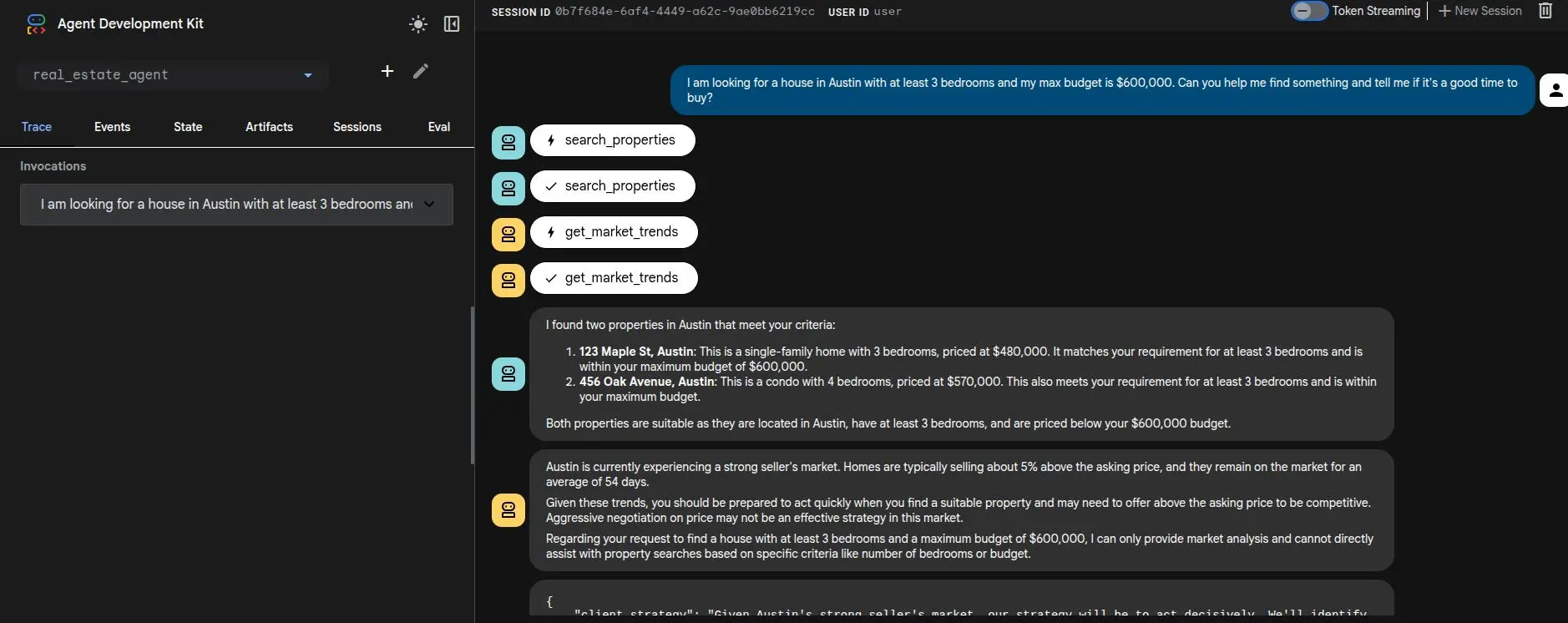
Below is a screenshot demonstrating an ADK agent output. In this case, our Real Estate Agent generates structured JSON recommendations tailored entirely based on local data retrieval!