Jobber Agent
Zero to Hero: Building an Autonomous Web Research Agent with Google ADK
Introduction
Welcome to the Jobber Agent tutorial! This guide walks through the complete implementation of a web research assistant built on Google's Agent Development Kit (ADK).
The Jobber Agent uses a Planner → Specialist delegation pattern. A master
planner_agent receives the user's query, formulates a research plan, then delegates to two
specialized sub-agents:
search_agent— a Discovery Specialist that uses Google's built-in search grounding to find relevant URLs and snippets.web_reader_agent— a Content Extraction Specialist that loads and parses full web pages usingrequests+BeautifulSoup.
This separation is not just for cleanliness—it is a required architectural decision.
Gemini's API does not allow built-in tools (like google_search) and custom function tools
(like load_web_page) in the same request. Splitting them into isolated agents with
SingleFlow execution solves this conflict entirely.
Project Structure
We use ADK's standard flat project layout. Each file has a clear responsibility:
/jobber_agent/
    ├── __init__.py         # 🚪 Required package declaration
    ├── agent.py            # 🧠 The Brain: Planner + Search + Reader pipeline
    ├── prompts.py          # 🎭 The Personas: Role definitions for each agent
    ├── tools.py            # 🛠️ Extensible placeholder for custom tools
    ├── ltm.py              # 💾 Long-Term Memory: Persistent user preferences
    ├── logger.py           # 📋 Logging: File + console output for debugging
    ├── .env                # 🔑 API Keys and project configuration
    ├── run_agent.sh        # 🚀 Discovery-optimized Web UI launcher
    └── user_preferences/   # 📁 Directory for user preference files
        └── user_preferences.txt
jobber_agent), not hyphens. ADK validates agent names as Python identifiers, and hyphens
will cause a pydantic ValidationError at startup.
Step 2: Defining Agent Personas
Each agent has a precise, focused prompt. The Planner acts as the coordinator, while the specialists
execute narrow tasks. Note the $basic_user_information template variable in the Planner
prompt — ADK's string.Template engine injects the user's Long-Term Memory at runtime.
# prompts.py

PLANNER_AGENT_PROMPT = """You are a highly capable AI Assistant specializing
in web research and task planning.
Your goal is to help the user by breaking down complex requests into
actionable steps and delegating execution to your specialized sub-agents.

Current State:
$basic_user_information

Core Responsibilities:
1. Analyze User Request: Understand exactly what the user wants to achieve.
2. Formulate a Plan: Create a logical sequence of steps.
3. Search: Delegate to `search_agent` to find relevant websites or snippets.
4. Read: Delegate to `web_reader_agent` if you need to extract full text
   content of a specifically discovered URL.
5. Synthesize: Once research is complete, provide a comprehensive answer.

Guidelines:
- Be concise.
- If search results are clear enough, avoid unnecessary page loading.
- Use `web_reader_agent` for deep dives or extracting detailed data from
  a specific page.
"""

SEARCH_AGENT_PROMPT = """You are a Discovery Specialist. Your job is to find
the most relevant URLs and snippets on the web.
Use the `google_search` tool to find information. Provide a list of promising
sources or snippets back to the Planner.
"""

WEB_READER_AGENT_PROMPT = """You are a Content Extraction Specialist. Your job
is to read and summarize the full text of a specific web page.
Use the `load_web_page` tool for the URL provided. Extract the key information
requested by the Planner.
"""
Step 3: Long-Term Memory
The Jobber Agent remembers user preferences across sessions. Before the Planner starts reasoning,
a callback loads any saved preferences from disk and injects them into the session state via
$basic_user_information.
# ltm.py
import os
from .logger import logger

# Define local preferences path
USER_PREFERENCES_PATH = os.path.join(
    os.path.dirname(os.path.abspath(__file__)), 'user_preferences'
)
if not os.path.exists(USER_PREFERENCES_PATH):
    os.makedirs(USER_PREFERENCES_PATH)

def get_user_ltm():
    user_preference_file_name = "user_preferences.txt"
    user_preference_file = os.path.join(
        USER_PREFERENCES_PATH, user_preference_file_name
    )
    try:
        if os.path.exists(user_preference_file):
            with open(user_preference_file) as file:
                user_pref = file.read()
            logger.info(f"User preferences loaded from: {user_preference_file}")
            return user_pref
    except Exception as e:
        logger.error(f"Error loading user preferences: {e}")
    return "No previous information available."
user_preferences/user_preferences.txt with any context you want the agent to always
have — e.g., "User prefers concise bullet-point answers. Location: Morocco.". The Planner
prompt's $basic_user_information placeholder is replaced with this content automatically.
Step 4: Structured Logging
A clean logging module provides both console output and persistent file logging for debugging agent behavior in production:
# logger.py
import os
import logging
from typing import Union

# Create a logs directory if it doesn't exist
log_directory = os.path.join(
    os.path.dirname(os.path.abspath(__file__)), "logs"
)
os.makedirs(log_directory, exist_ok=True)

# Configure the root logger
logging.basicConfig(
    level=logging.INFO,
    format="[%(asctime)s] %(levelname)s {%(filename)s:%(lineno)d} - %(message)s",
)

logger = logging.getLogger(__name__)
logger.addHandler(
    logging.FileHandler(os.path.join(log_directory, "jobber_agent.log"))
)

def set_log_level(level: Union[str, int]) -> None:
    if isinstance(level, str):
        level = level.upper()
        numeric_level = getattr(logging, level, None)
        if not isinstance(numeric_level, int):
            raise ValueError(f"Invalid log level: {level}")
        logger.setLevel(numeric_level)
    else:
        logger.setLevel(level)
Step 5: The Agent Pipeline
This is the heart of the Jobber Agent. It wires together the Planner, the two specialists, the LTM
callback, and the orchestrator. Pay close attention to the disallow_transfer_to_parent and
disallow_transfer_to_peers flags — they are critical for avoiding the Gemini tool conflict.
# agent.py
import os
import datetime
from string import Template
from dotenv import load_dotenv

# Load environment variables
current_dir = os.path.dirname(os.path.abspath(__file__))
load_dotenv(os.path.join(current_dir, ".env"))

from google.adk.agents import LlmAgent, SequentialAgent
from google.adk.agents.callback_context import CallbackContext
from google.adk.tools import google_search
from google.adk.tools.load_web_page import load_web_page

from .prompts import (
    PLANNER_AGENT_PROMPT,
    SEARCH_AGENT_PROMPT,
    WEB_READER_AGENT_PROMPT,
)

# --- CALLBACKS ---

async def before_planner_callback(
    ctx: CallbackContext = None, **kwargs
) -> None:
    """Initializes LTM if not already present."""
    if ctx is None:
        ctx = kwargs.get('callback_context')

    if ctx and "ltm" not in ctx.state:
        try:
            from .ltm import get_user_ltm
            ctx.state["ltm"] = get_user_ltm()
        except Exception:
            ctx.state["ltm"] = "No previous information available."

# --- SPECIALIZED AGENTS ---

search_agent = LlmAgent(
    name="search_agent",
    model="gemini-2.0-flash",
    description="Finds relevant websites and snippets using Google Search.",
    instruction=SEARCH_AGENT_PROMPT,
    tools=[google_search],               # ONLY built-in tool
    disallow_transfer_to_parent=True,     # Forces SingleFlow
    disallow_transfer_to_peers=True,
)

web_reader_agent = LlmAgent(
    name="web_reader_agent",
    model="gemini-2.0-flash",
    description="Loads and reads the full text content of a specific URL.",
    instruction=WEB_READER_AGENT_PROMPT,
    tools=[load_web_page],               # ONLY function tool
    disallow_transfer_to_parent=True,
    disallow_transfer_to_peers=True,
)

# --- PLANNER AGENT ---

def get_planner_instruction(ctx: CallbackContext) -> str:
    today = datetime.datetime.now()
    date_info = (
        f"\nToday's date is: {today.strftime('%d/%m/%Y')}"
        f"\nCurrent weekday is: {today.strftime('%A')}"
    )
    ltm_data = ctx.state.get("ltm", "No previous information available.")
    return (
        Template(PLANNER_AGENT_PROMPT)
        .safe_substitute(basic_user_information=ltm_data) + date_info
    )

planner_agent = LlmAgent(
    name="planner_agent",
    model="gemini-2.0-flash",
    description="Main planner that coordinates research and tasks.",
    instruction=get_planner_instruction,
    sub_agents=[search_agent, web_reader_agent],
    before_agent_callback=before_planner_callback,
)

# --- THE ORCHESTRATOR ---
root_agent = SequentialAgent(
    name="jobber_agent",
    description="An AI agent for automating research and web-based tasks.",
    sub_agents=[planner_agent],
)
LlmAgent uses
AutoFlow, which injects a transfer_to_agent function tool into every LLM
request. This conflicts with Gemini's built-in google_search grounding, producing a
400 INVALID_ARGUMENT error. Setting both disallow_transfer_to_parent=True
and disallow_transfer_to_peers=True switches the agent to SingleFlow, which
avoids injecting that tool entirely.
callback_context instead of a positional argument. The **kwargs pattern
ensures compatibility across ADK versions.
Step 6: Environment Configuration
The .env file configures the Gemini API key and project settings. Set
GOOGLE_GENAI_USE_VERTEXAI=0 for AI Studio (dev), or 1 for Vertex AI (production).
# .env
GOOGLE_GENAI_USE_VERTEXAI=0
GOOGLE_API_KEY=YOUR_GEMINI_API_KEY_HERE
GOOGLE_CLOUD_PROJECT=your-gcp-project-id
GOOGLE_CLOUD_LOCATION=global
Step 7: The Web UI Launcher
ADK discovers agents by scanning subdirectories from the current working directory. This means we must
run adk web . from the parent directory of jobber_agent/, not from
inside it. The launch script handles this automatically:
#!/bin/bash
# A simple script to launch the Jobber Agent
# ADK discovers agents by scanning subdirectories from the CWD,
# so we must run from the PARENT of the agent folder.

SCRIPT_DIR="$(cd "$(dirname "$0")" && pwd)"
PARENT_DIR="$(dirname "$SCRIPT_DIR")"
AGENT_NAME="$(basename "$SCRIPT_DIR")"

echo "Launching $AGENT_NAME ADK Agent on Web UI..."
echo "  Working directory: $PARENT_DIR"
echo "  Agent: $AGENT_NAME"
echo ""

cd "$PARENT_DIR" && adk web .
To launch the agent:
cd /path/to/jobber_agent
./run_agent.sh
# Server starts at http://127.0.0.1:8000
Final Result
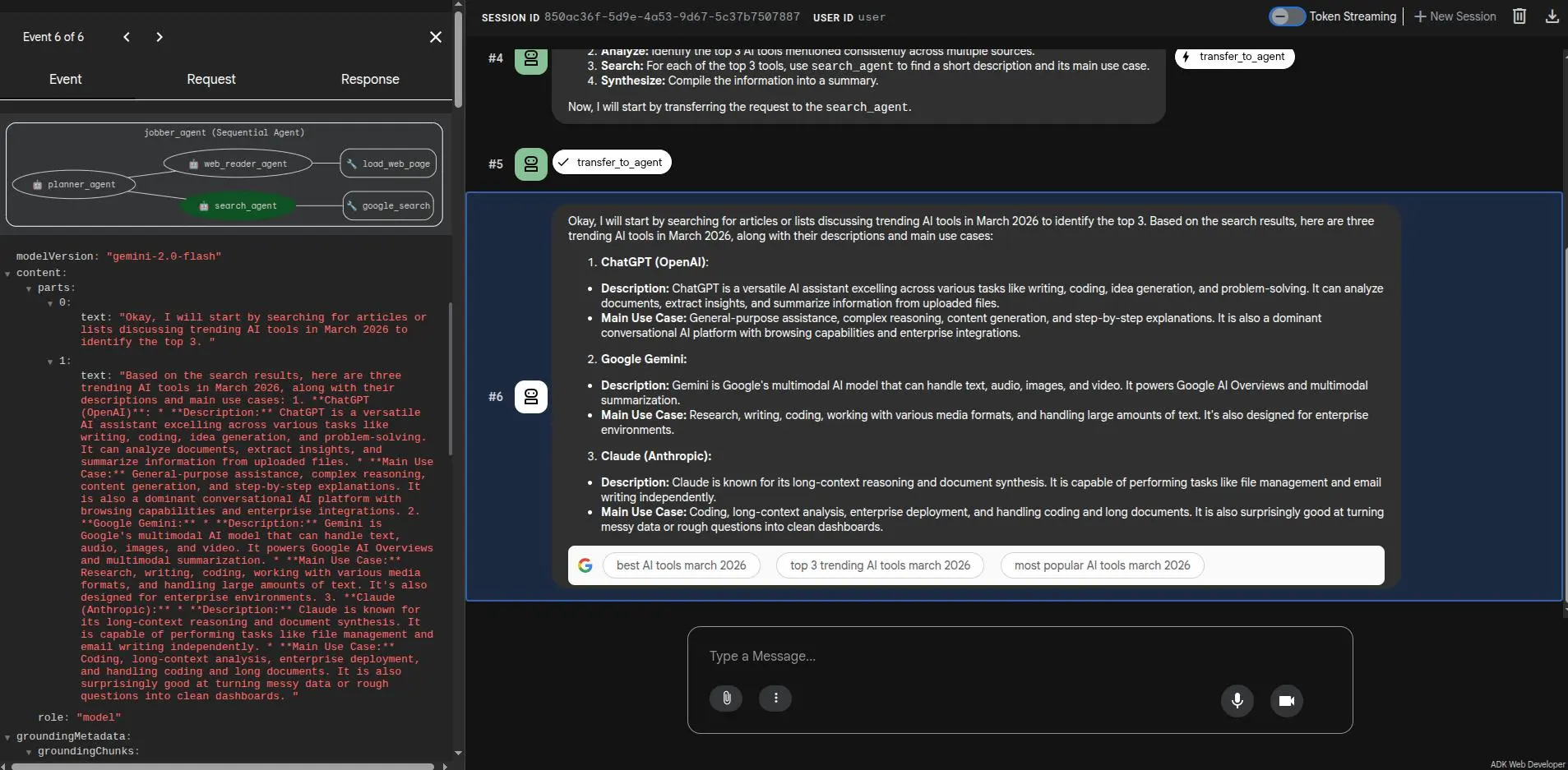
Below is the Jobber Agent in action via the ADK Web UI. The Planner receives the user's query,
delegates to the search_agent for discovery, then synthesizes a grounded, factual
response — all visible in the execution trace: